Block — TryHackMe Writeup
Hey everyone,
This is my writeup for the Block room on TryHackMe. This one was a proper network forensics challenge — no web exploits, no brute force on services. Just two artifact files and your brain. I genuinely got stuck on the flag questions and had to refer to writeups for those — I’ll be honest about that below.
Thank you and enjoy reading….
Overview
We are given two files:
traffic.pcapng— a network packet capturelsass.DMP— a memory dump of the Windows LSASS process
The 6 questions to answer:
| # | Question |
|---|---|
| 1 | Username of User 1 |
| 2 | Password of User 1 |
| 3 | Flag 1 |
| 4 | Username of User 2 |
| 5 | NTLM Hash of User 2 |
| 6 | Flag 2 |
One thing I noticed immediately — User 1 needs a password, but User 2 needs a hash. That asymmetry is a big clue about what approach to use for each.
Q1 & Q4 — Usernames (tshark)
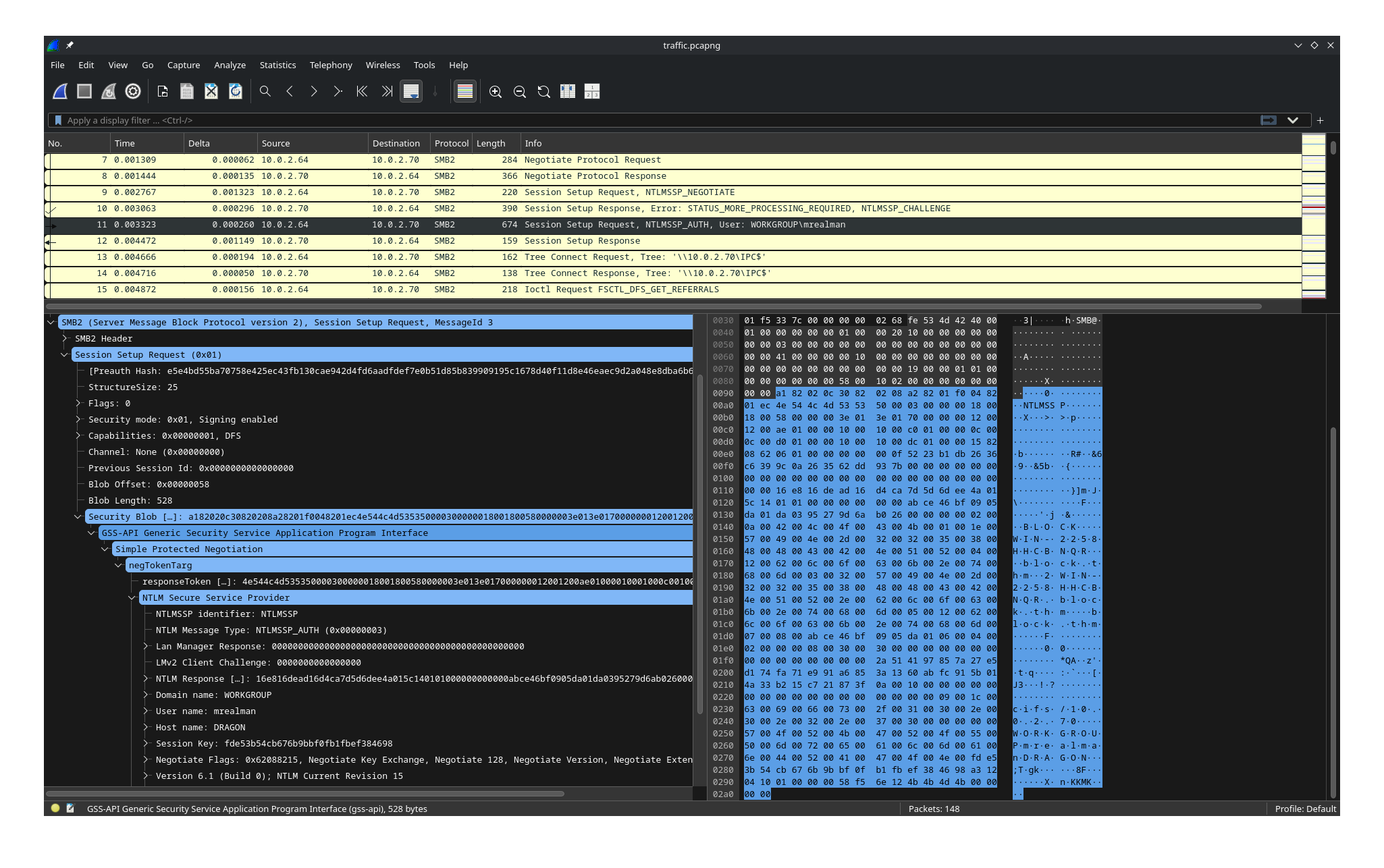
I opened the PCAP in Wireshark first and browsed through the SMB traffic. The NTLM authentication packets were visible and I could see usernames in the NTLMSSP_AUTH messages, but I wanted a clean way to pull them so I used tshark.
1
2
3
4
tshark -r traffic.pcapng -Y "ntlmssp" -T fields \
  -e frame.number \
  -e ntlmssp.messagetype \
  -e ntlmssp.auth.username
1
2
3
4
5
6
9       0x00000001
10      0x00000002
11      0x00000003      mrealman
80      0x00000001
81      0x00000002
82      0x00000003      eshellstrop
This gives the full NTLM exchange sequence clearly:
- Frames 9–11: NEGOTIATE → CHALLENGE → AUTH for User 1
- Frames 80–82: NEGOTIATE → CHALLENGE → AUTH for User 2
I also ran a more detailed query to confirm domains and hostnames:
1
2
tshark -r traffic.pcapng -Y "ntlmssp" -V \
  | grep -E "User name:|Domain name:|Host name:|NTLM Message Type"
1
2
3
4
5
6
7
8
9
10
11
12
NTLM Message Type: NTLMSSP_NEGOTIATE (0x00000001)
NTLM Message Type: NTLMSSP_CHALLENGE (0x00000002)
NTLM Message Type: NTLMSSP_AUTH (0x00000003)
    Domain name: WORKGROUP
    User name: mrealman
    Host name: DRAGON
NTLM Message Type: NTLMSSP_NEGOTIATE (0x00000001)
NTLM Message Type: NTLMSSP_CHALLENGE (0x00000002)
NTLM Message Type: NTLMSSP_AUTH (0x00000003)
    Domain name: WORKGROUP
    User name: eshellstrop
    Host name: DRAGON
Answer 1 → mrealman
Answer 4 → eshellstrop
Q2 — Password of User 1 (NetNTLMv2 Cracking)
For NetNTLMv2, Hashcat mode 5600 expects:
1
username::domain:ServerChallenge:NTProofStr:Blob
Here’s where each field comes from:
| Field | Source |
|---|---|
| Username | NTLM AUTH packet (frame 11) |
| Domain | NTLM AUTH packet (frame 11) |
| Server Challenge | NTLM CHALLENGE packet (frame 10) |
| NTProofStr | First 16 bytes of NTLMv2 Response (frame 11) |
| Blob | Everything after the first 16 bytes of NTLMv2 Response |
Step 1 — Username & Domain
1
2
3
4
5
6
7
tshark -r traffic.pcapng -Y "frame.number==11" \
  -T fields -e ntlmssp.auth.username
# mrealman

tshark -r traffic.pcapng -Y "frame.number==11" \
  -T fields -e ntlmssp.auth.domain
# WORKGROUP
Step 2 — Server Challenge (from frame 10)
1
2
tshark -r traffic.pcapng -Y "frame.number==10" \
  -T fields -e ntlmssp.ntlmserverchallenge
1
2a9c5234abca01e7

Step 3 — NTLMv2 Response (from frame 11)
1
2
tshark -r traffic.pcapng -Y "frame.number==11" \
  -T fields -e ntlmssp.ntlmv2_response

The response has two parts:
1
2
3
4
┌──────────────16 bytes─────────────┐┌─────────Blob──────────┐
16e816dead16d4ca7d5d6dee4a015c14   0101000000000000....
^^^^^^^^^^^^^^^^^^^^^^^^^^^^^^^^
        NTProofStr
The first 32 hex characters (16 bytes) = NTProofStr
Everything after = Blob
Step 4 — Construct the hash and crack
Assemble and save to hash.txt:
1
mrealman::WORKGROUP:16d5f6d8e4d8....:16e816dead16d4ca7d5d6dee4a015c14:0101000000000000...
Then crack:
1
hashcat -m 5600 hash.txt /usr/share/wordlists/rockyou.txt
or
1
john hash.txt --wordlist=/usr/share/wordlists/rockyou.txt --format=netntlmv2
mrealman::WORKGROUP:… → Blockbuster1
A lesson I learned here
Initially I copied the entire value returned by tshark -e ntlmssp.ntlmv2_response and treated it as the hash directly. Hashcat kept returning Exhausted even though I knew the password had to be simple. After reading Hashcat’s NetNTLMv2 format documentation, I realized the ntlmv2_response field actually contains two separate components — the NTProofStr (first 16 bytes) and the authentication blob (the rest). Once I split those correctly and assembled the full hash format, Hashcat cracked it instantly. Understanding the protocol structure matters just as much as knowing which tool to run.
Answer 2 → Blockbuster1
Q3 — Flag 1 (Decrypting SMB with User 1’s Password)
I’ll be honest — I couldn’t figure this one out on my own. The SMB traffic was encrypted (SMB3 Transform Headers everywhere) and I spent a long time looking at the wrong things. Got this from a writeup.
The actual approach was much simpler than what I was trying:
In Wireshark, go to:
Edit → Preferences → Protocols → NTLMSSP
Enter mrealman’s cracked password: Blockbuster1
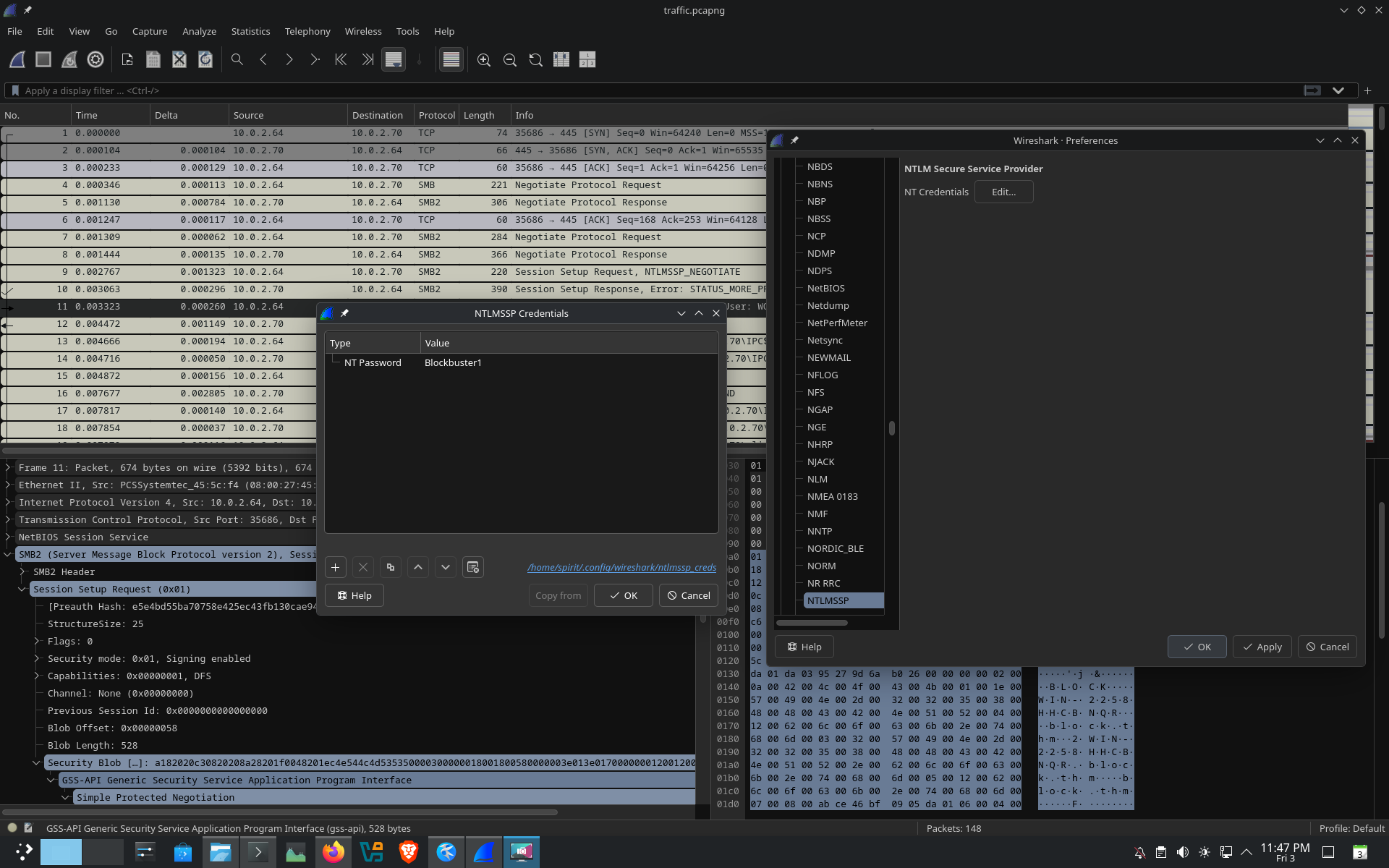
Wireshark automatically uses this to derive the session key and decrypt the SMB traffic. After that:
1
File → Export Objects → SMB
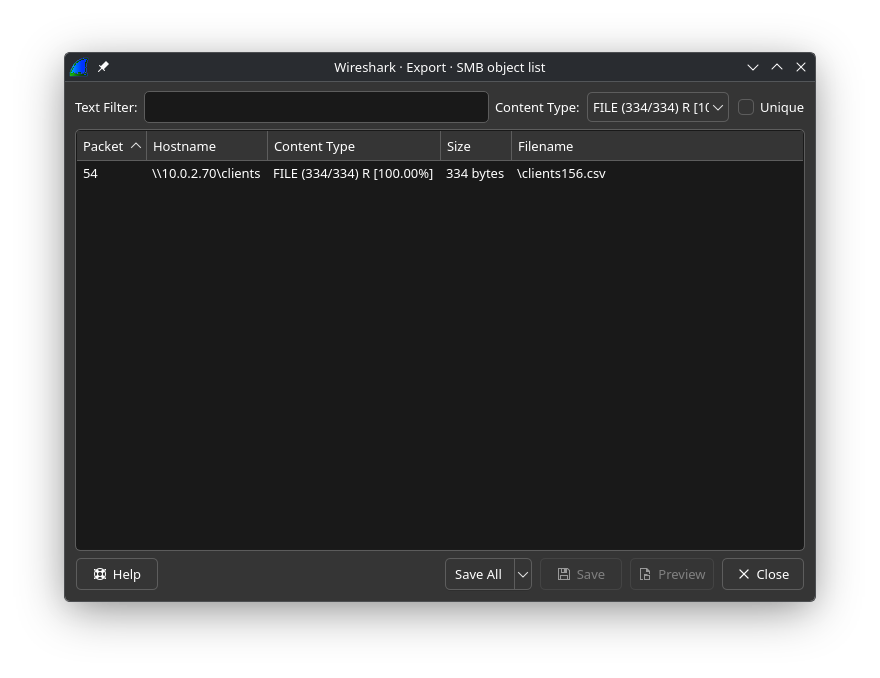
A file named clients156.csv appeared. Downloading and opening it revealed the first flag.
Answer 3 → THM{SmB_DeCrypTing_who_Could_Have_Th0ughT}
Q5 — NTLM Hash of User 2 (LSASS Dump)
Since the question asked for a hash rather than a password, I went straight to lsass.DMP using pypykatz:
1
pypykatz lsa minidump lsass.DMP | grep -A20 -i eshellstrop
1
2
3
4
5
6
7
8
9
10
11
12
username    eshellstrop
domainname  BLOCK
logon_server WIN-2258HHCBNQR
logon_time  2023-10-22T16:46:09.215626+00:00
sid         S-1-5-21-3761843758-2185005375-3584081457-1103

== MSV ==
    Username: eshellstrop
    Domain:   BLOCK
    LM:       NA
    NT:       3f29138a04aadc19214e9c04028bf381
    SHA1:     91374e6e58d7b523376e3b1eb04ae5440e678717
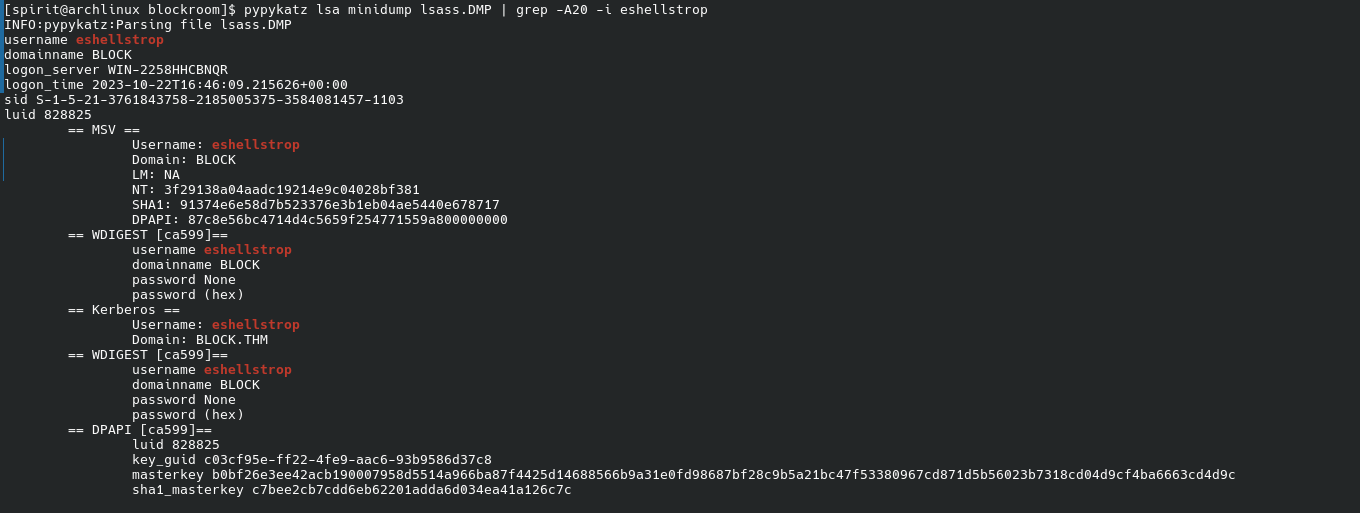
Answer 5 → 3f29138a04aadc19214e9c04028bf381
Q6 — Flag 2 (SMB Decryption via Session Key Derivation)
Also couldn’t solve this one on my own. For eshellstrop we have no plaintext password — only an NT hash. So the NTLMSSP password trick from Q3 won’t work here. This required deriving the SMB Random Session Key from the NTLM handshake.
From Frame 82 in Wireshark (eshellstrop’s NTLMSSP_AUTH):
- NTProofStr:
0ca6227a4f00b9654a48908c4801a0ac - Encrypted Session Key:
c24f5102a22d286336aac2dfa4dc2e04
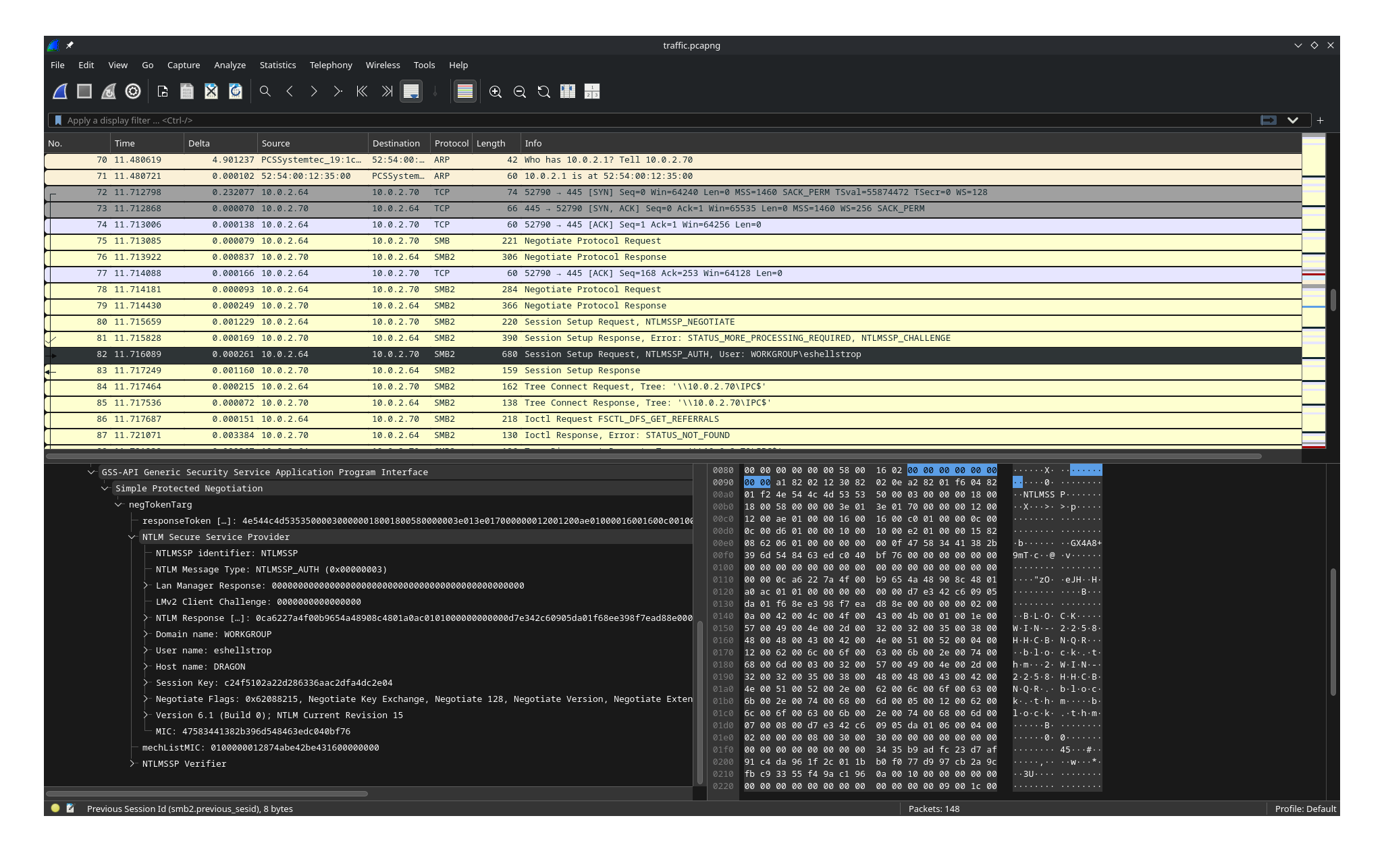
Running the session key derivation script with the NT hash (no password needed):
1
2
3
4
5
6
python3 script.py \
  -u eshellstrop \
  -d WORKGROUP \
  -n 0ca6227a4f00b9654a48908c4801a0ac \
  -k c24f5102a22d286336aac2dfa4dc2e04 \
  --ntlmhash 3f29138a04aadc19214e9c04028bf381

1
Random SK: facfbdf010d00aa2574c7c41201099e8
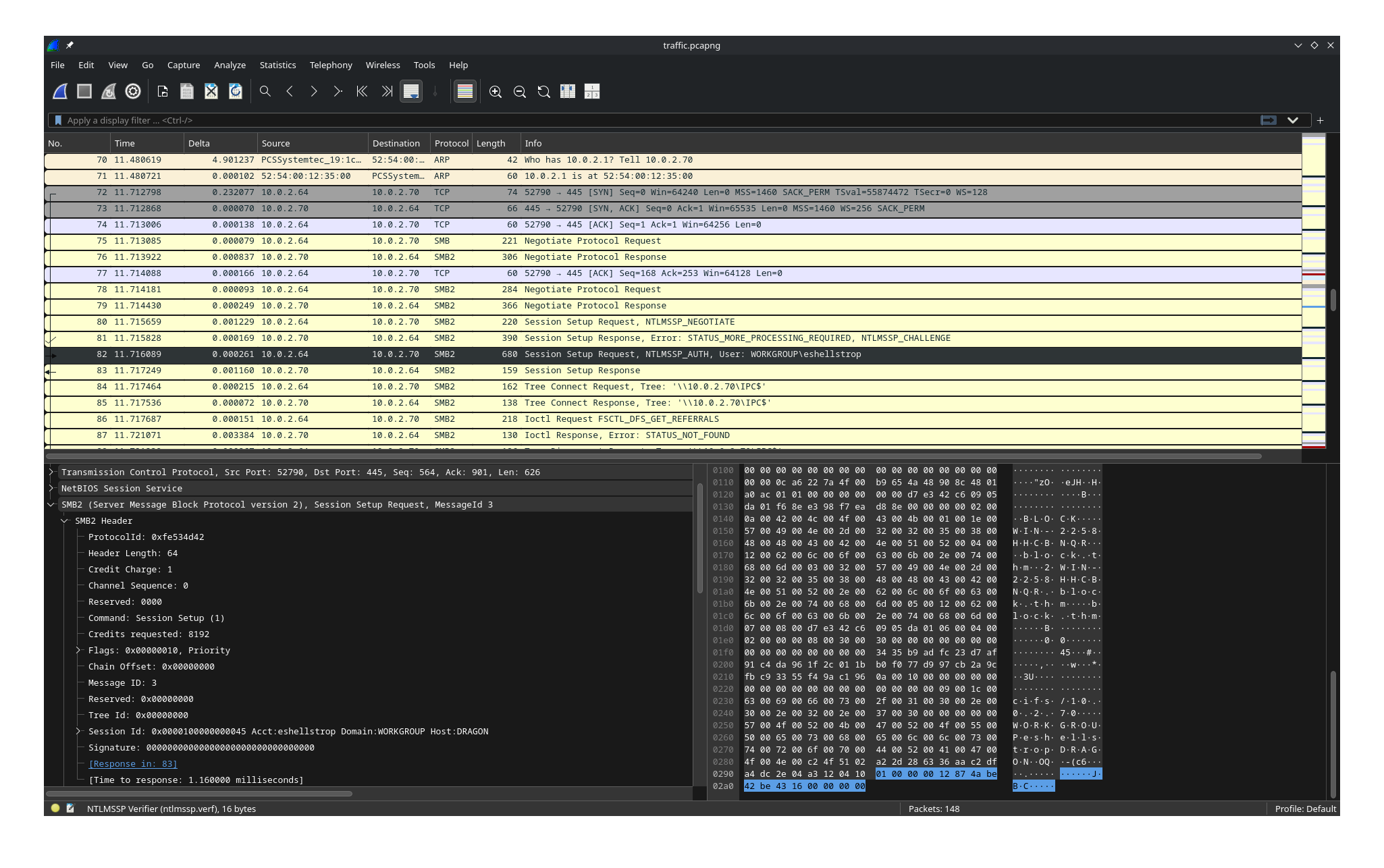
Next, go to Frame 82 (or the nearest encrypted SMB packet under eshellstrop’s session) and copy the Session ID as hex stream:
1
4500000000100000
Now in Wireshark go to:
1
Edit → Preferences → Protocols → SMB2 → Secret session keys for decryption
Add an entry:
- Session ID:
4500000000100000 - Random Session Key:
20a642c086ef74eee26227bf1d0cff8c
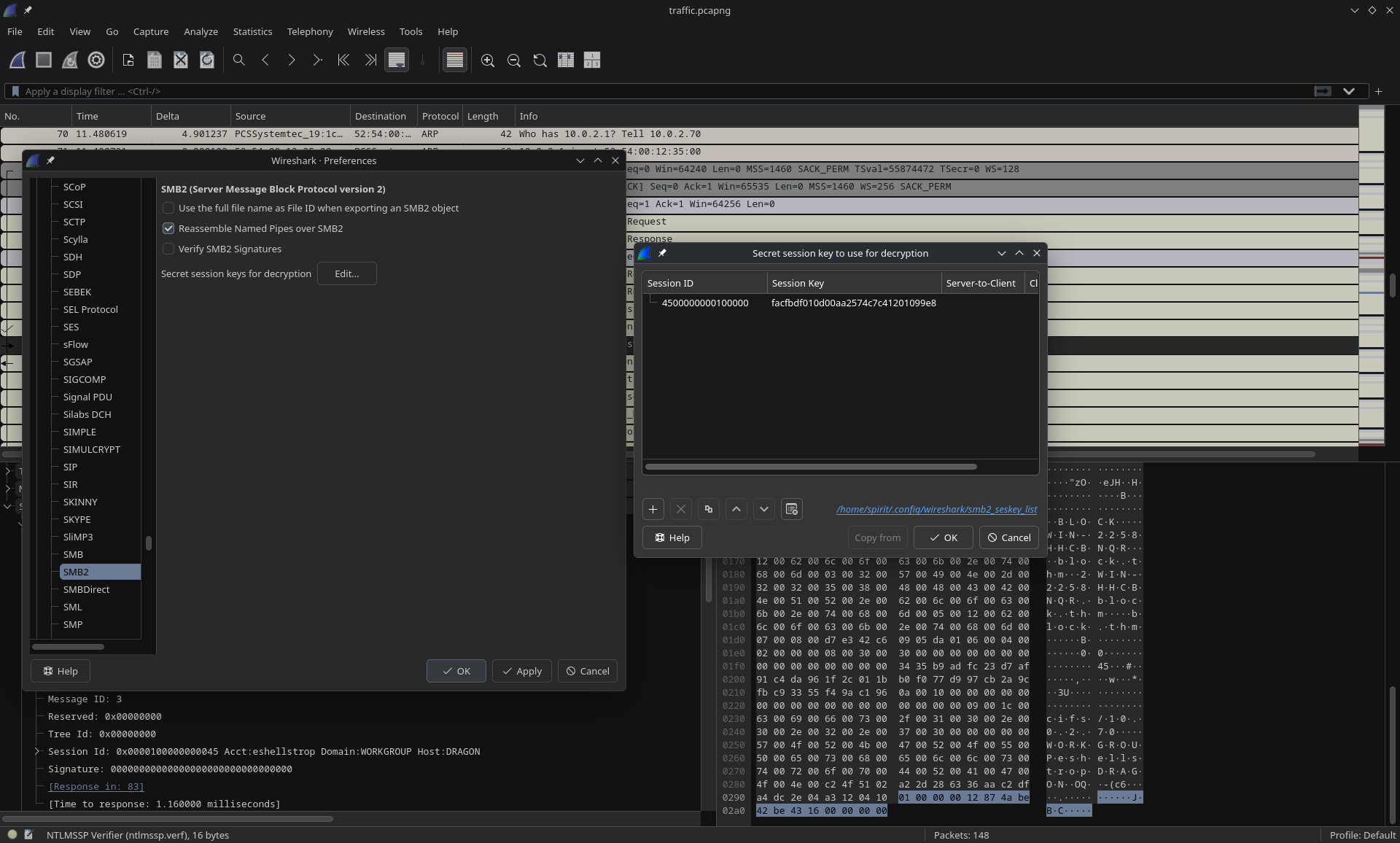
After clicking OK, Wireshark automatically decrypts the SMB3 stream for eshellstrop’s session.
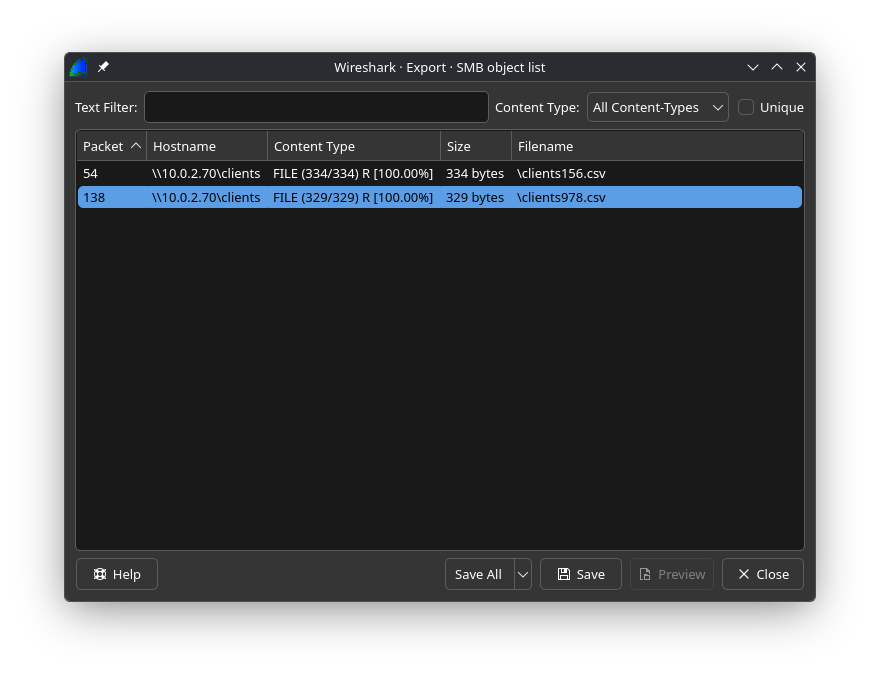
1
File → Export Objects → SMB
Download clients978.csv, open it, and the second flag is inside.
Answer 6 → THM{No_PasSw0Rd?_No_Pr0bl3m}
Summary
| # | Question | Answer |
|---|---|---|
| 1 | Username (User 1) | mrealman |
| 2 | Password (User 1) | Blockbuster1 |
| 3 | Flag 1 | THM{SmB_DeCrypTing_who_Could_Have_Th0ughT} |
| 4 | Username (User 2) | eshellstrop |
| 5 | NTLM Hash (User 2) | 3f29138a04aadc19214e9c04028bf381 |
| 6 | Flag 2 | THM{No_PasSw0Rd?_No_Pr0bl3m} |
Key Takeaways
- tshark is underrated — pulling specific fields from a PCAP is way faster than clicking through Wireshark for every packet
- Know the NetNTLMv2 format — NTProofStr and the Blob are separate parts of the ntlmv2_response field. Treating the whole thing as the hash is a common mistake
- Wireshark can decrypt SMB with just a password — if you have the plaintext, NTLMSSP preferences handles the session key derivation automatically
- Pass-the-Hash works for session key derivation too — the NT hash alone is sufficient to derive the Random Session Key for SMB3 decryption, no plaintext needed
- LSASS dumps reveal hashes even when passwords aren’t stored — WDIGEST showed no password for eshellstrop, but MSV had the NT hash which was enough
- Encrypted SMB doesn’t mean you’re blocked — if you can recover the NTLM handshake and derive the session key, Wireshark decrypts the stream for you
I solved Q1, Q2, Q4, and Q5 independently. Q3 and Q6 needed writeup help — the session key derivation concept wasn’t something I’d encountered before. Definitely going to read more about SMB3 encryption internals after this one.