Building HEXFORGE — A Python File Forensics Tool
Intro
Hey folks, how's it going?
I just vibe coded a tool which is very helpfull in solving many rooms in forensics, i have done forensics challenges by manually scanning the files so y not do it all with just one script thats where this idea came to my mind.
If your a cybersecurity enthusiast like me then do make sure to check this tool out. so this tool works by ckecking the hex or otherwise known as Magic signature to find and then validate the findings that is all and also cheks the readable strings and all that the repeatative stuff, and also dont worry about the false positives i have tried this on test cases and some ctf challenges and know what this thing works. And for the nerds below is the full discription.
Thank you all
Background
Every CTF player has run binwalk on a challenge file hoping for a quick win, only to get a wall of false positives — or worse, a clean scan on a file that obviously has something hidden in it. I got tired of stitching together file, strings, binwalk, and a hex editor for every forensics challenge. So I built HEXFORGE: a single Python script, zero dependencies, that does all of it.
This post walks through why I built it, the core architecture decisions, and the real-world results on CTF challenge files.
The tool is on GitHub: github.com/arvdch/hexforge
The Problem with Magic Byte Scanning
The core challenge in file forensics is distinguishing real embedded files from coincidental byte sequences. A 2-byte magic like \x78\xda (zlib compressed data) appears roughly once every 65,536 bytes purely by chance — and a typical PNG image contains hundreds of kilobytes of compressed deflate data in its IDAT chunks. Running a naive scanner over a PNG will produce dozens of fake zlib, JFFS2, JXL, and MP3 hits from the compressed pixel data.
Binwalk handles this with a large signature database and some heuristics, but its false positive rate on compressed files is significant. I wanted something cleaner.
The Architecture: Two Layers of Suppression
Layer 1 — Structural Validators
The first fix is giving every short-magic signature a format-specific validation function. When a 2-byte or 4-byte magic is found, the validator checks the surrounding bytes for structural coherence:
- BMP (
BM): DIB header size must be 12, 40, 108, or 124 - MP3 (
\xff\xfb): bitrate nibble must be 1–14, sample rate index ≤ 12 - GZIP (
\x1f\x8b): CM byte must be 8, FLG reserved bits must be 0 - ZIP (
PK\x03\x04): version-needed field must be ≤ 63 - TTF (
\x00\x01\x00\x00): searchRange must equal(2^floor(log2(numTables))) * 16 - JPEG (
\xff\xd8\xff): 4th byte must be a valid JFIF/EXIF/APPn marker
Longer magic sequences (≥ 6 bytes) are trusted unconditionally — the probability of a 6-byte sequence appearing by chance inside deflate output is approximately 1 in 281 trillion.
Layer 2 — Compressed Region Mapper
Even with validators, some short magic sequences get through. The deeper fix is mapping out compressed spans before scanning:
1
2
3
4
5
6
7
8
9
10
11
12
13
14
15
16
17
def build_compressed_regions(data: bytes) -> list[tuple[int, int, str]]:
    regions = []

    # Walk PNG chunk structure to find IDAT spans
    if data[:8] == b"\x89PNG\r\n\x1a\n":
        pos = 8
        while pos + 12 <= len(data):
            clen  = struct.unpack_from(">I", data, pos)[0]
            ctype = data[pos + 4:pos + 8]
            if ctype == b"IDAT":
                regions.append((pos + 8, pos + 8 + clen, "PNG-IDAT"))
            pos += 12 + clen

    # Walk GZIP members and zlib streams
    # ... (drain via zlib.decompressobj to find exact boundaries)

    return regions
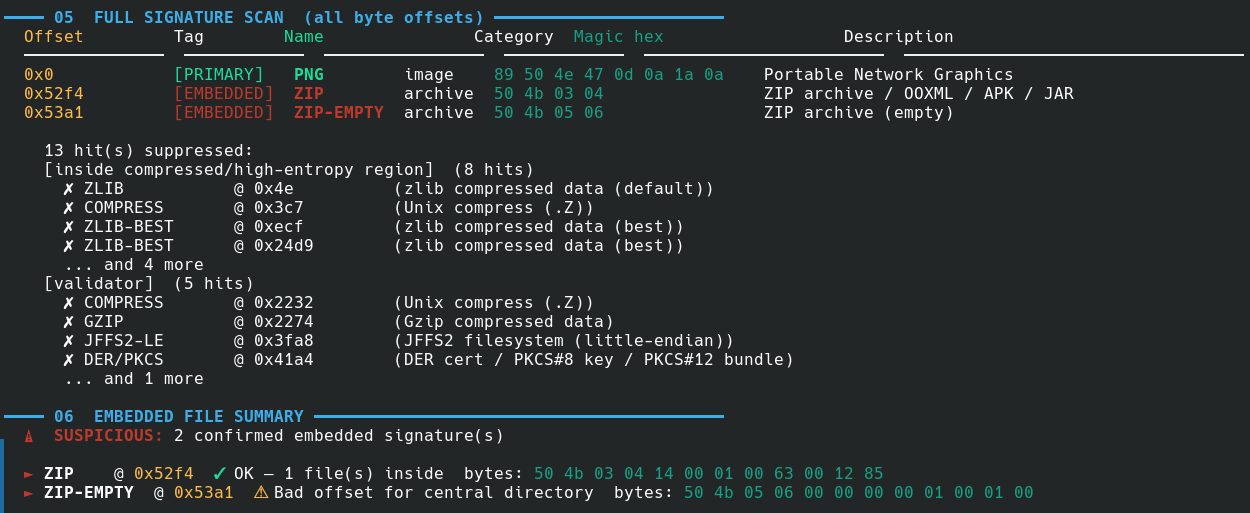
Any hit inside a mapped region is suppressed if the magic is shorter than 6 bytes. On the CTF challenge PNG below, this drops 13 false positives and leaves exactly 2 real embedded signatures.
GZIP Boundary Detection
Binwalk’s GZIP carving fails in a specific way: GZIP has no footer marker, so without structural analysis, the carved file runs to the end of the original file. HEXFORGE solves this by walking the deflate stream:
1
2
3
4
5
6
7
8
9
10
11
12
13
14
def find_gzip_end(data: bytes, off: int) -> int:
    # Parse header flags to skip optional FNAME/FEXTRA/FCOMMENT fields
    flg = data[off + 3]
    pos = off + 10
    # ... skip optional fields ...

    # Feed the full slice to a raw deflate decompressor
    dobj = zlib.decompressobj(wbits=-15)
    dobj.decompress(data[pos:])

    if dobj.unused_data is not None:
        # unused_data = everything after the deflate stream ended
        stream_end = len(data) - len(dobj.unused_data)
        return stream_end + 8  # +8 for CRC32 + ISIZE trailer
The result is byte-exact GZIP carving — tested against a real gzip file followed by random junk bytes with zero overshoot.
Format-Aware Carving
Different file formats require different carving strategies. Here’s what HEXFORGE implements for each:
| Format | Boundary strategy |
|---|---|
| PNG | Find IEND chunk (4-byte CRC after it) |
| JPEG | Find \xff\xd9 EOI marker (capped at 20 MB) |
| ZIP | Find last PK\x05\x06 EOCD record + comment length |
| GZIP | Walk deflate stream via zlib.decompressobj |
Find last %%EOF marker | |
| ELF | Parse section header table offset + entry count |
| PE | Read SizeOfImage from Optional Header |
| TIFF | Walk IFD chain and compute max referenced data extent |
| PCAP | Walk packet records (header + caplen) to find the last packet |
| Everything else | Cap at 32 MB (prevents the 30 GB extraction bug) |
The TIFF IFD walker was added after a real-world bug: carving TIFF files from a PCAP was returning 3.4 MB blobs (the rest of the file) for each hit, and with 4 levels of recursion this produced over 30 GB of output. Walking the IFD chain gives the actual TIFF extent, typically < 1 MB.
LSB Steganography Detection
For image files, HEXFORGE runs a chi-squared test on the pixel LSBs. The theory: in a natural photograph, pixel values follow smooth distributions, making their LSBs somewhat non-uniform (high chi-squared). When LSB steganography replaces those bits with message data, the distribution becomes more uniform (lower chi-squared).
The detector uses a pure-Python PNG decoder that works without Pillow:
1
2
3
4
5
6
7
8
9
10
11
12
13
14
def _extract_png_pixels(data: bytes) -> Optional[bytes]:
    # Parse IHDR for dimensions and channel count
    w = struct.unpack_from(">I", data, 16)[0]
    h = struct.unpack_from(">I", data, 20)[0]

    # Collect and decompress all IDAT chunks
    idat = b"".join(chunk_data for each IDAT chunk)
    raw  = zlib.decompress(idat)

    # Strip filter byte from each scanline
    pixels = bytearray()
    for row in range(h):
        pixels += raw[row * (stride + 1) + 1 : ...]
    return bytes(pixels)
Beyond the chi-squared score, the detector extracts the first 64 bytes of the LSB bitstream (MSB-first) and checks if they look like printable text. On a CTF image with a flag embedded in the LSBs, this preview shows flag{lsb_hidden_in_plain_sight} directly in the terminal output.

XOR Obfuscation Detection
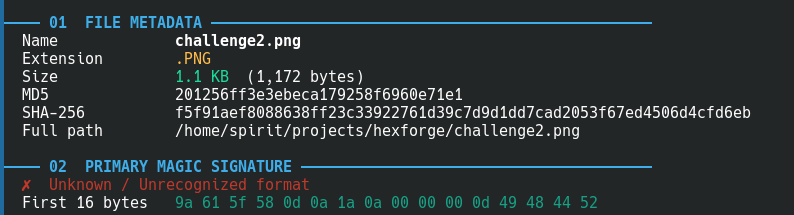
A common CTF trick is XOR-ing the magic bytes of a file to fool file and basic scanners. challenge2.png has its first byte changed from 0x89 to 0x9a — the file command reports it as “OpenPGP Public Key”. HEXFORGE catches this:
1
2
3
4
5
6
✗  Unknown / Unrecognized format
   First 16 bytes   9a 61 5f 58 0d 0a 1a 0a ...

⚡ Possible XOR obfuscation detected: PNG  (XOR key: 0x13)
   Decoded bytes: 89 50 4e 47 0d 0a 1a 0a
   Try: python3 -c "d=open('FILE','rb').read(); open('out','wb').write(bytes(b^0x13 for b in d))"
It scans all 255 possible single-byte XOR keys against the first 8 bytes and reports any that match a known magic signature.
Real CTF Example: challenge.png
The file is a 20.9 KB PNG. Binwalk scans it and finds nothing. HEXFORGE finds:
1
2
3
4
5
──── 06  EMBEDDED FILE SUMMARY ─────────────────────────────────────────
  ⚠  SUSPICIOUS: 2 confirmed embedded signature(s)

  ► ZIP    @ 0x52f4  ✓ OK — 1 file(s) inside
  ► ZIP-EMPTY  @ 0x53a1  ⚠ Bad offset for central directory
The ZIP at 0x52f4 contains flag.txt. The EOCD record at 0x53a1 is the normal end-of-ZIP marker — it always appears alongside a real ZIP. Section 07 (strings) also finds:
1
2
  0x31  password=ctf72026  [SENSITIVE]
  0x5312  flag.txt
The password is in the PNG’s tEXtComment chunk at byte 0x31. The flag.txt filename appears twice — once in the ZIP local file header and once in the central directory.
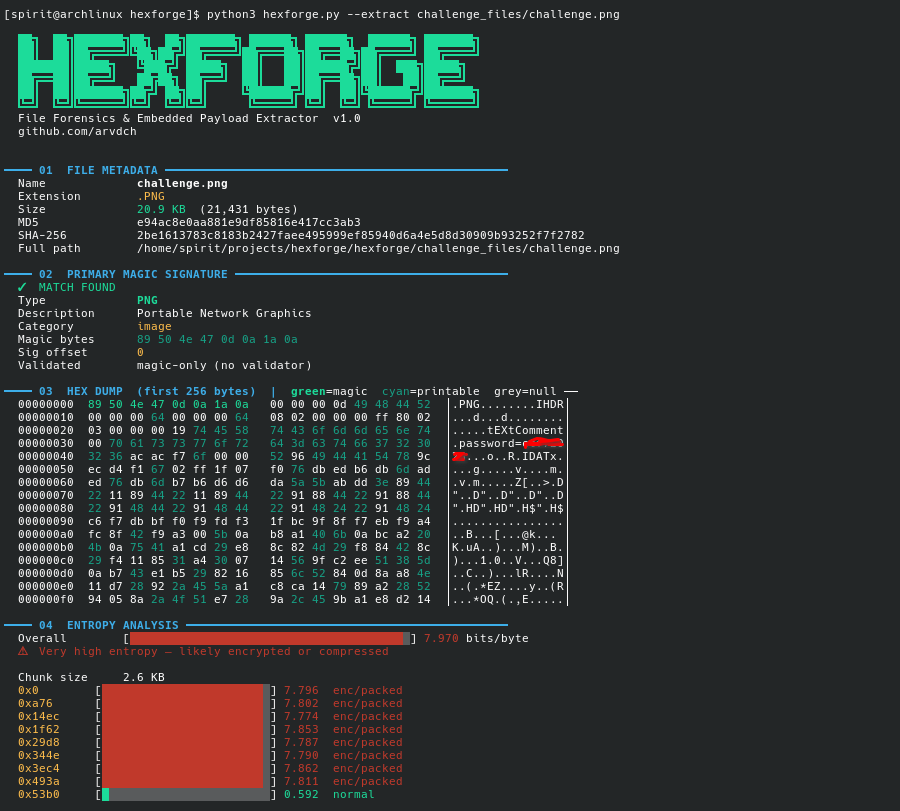
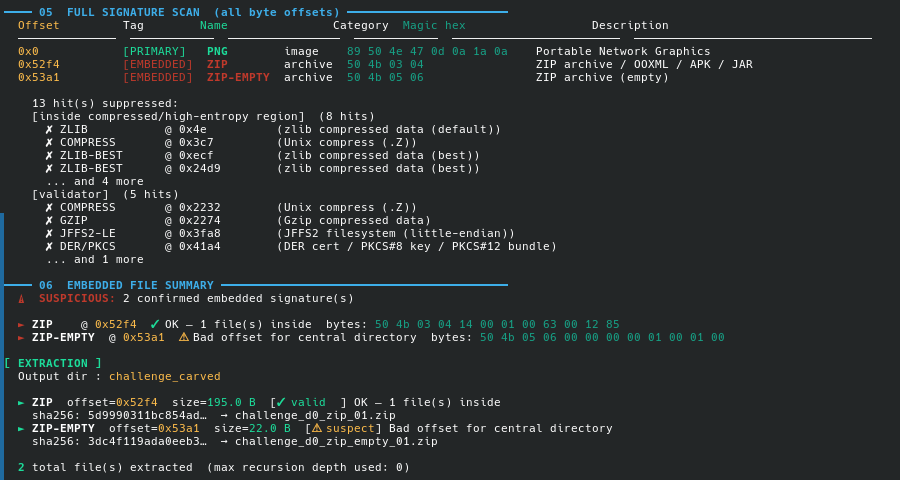
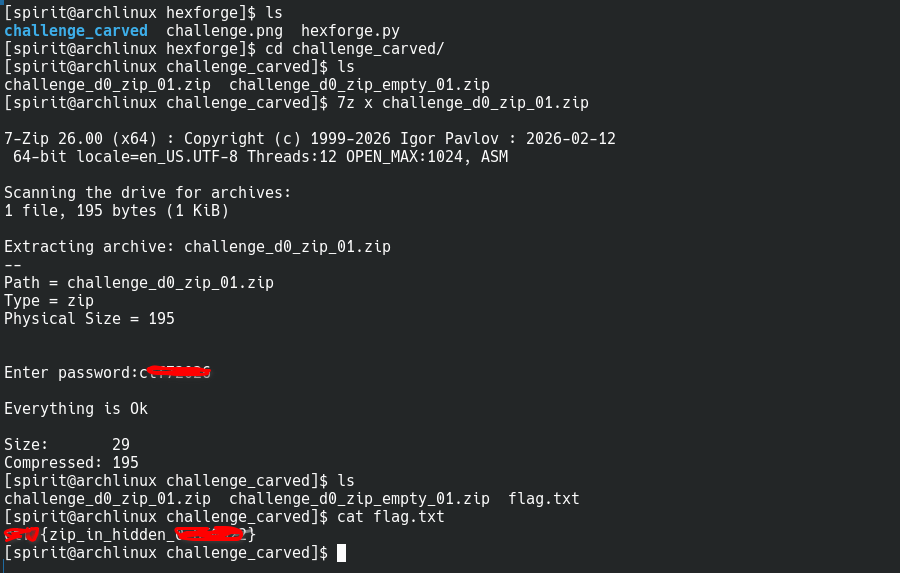
Running with --extract carves the ZIP precisely (using EOCD walking), opens it, and extracts flag.txt.
Batch Scanning a PCAP
The PCAP file from the CTF contained video frames embedded as JPEG images. Running hexforge with --scan:
1
python3 hexforge.py --scan ./captures/
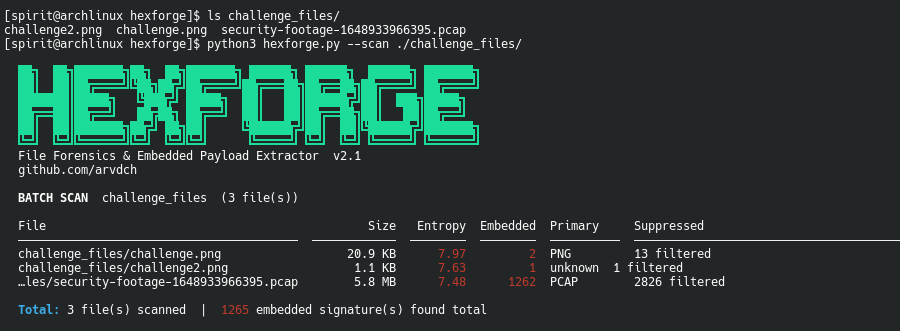
Then extracting with PCAP-aware carving:
1
python3 hexforge.py security-footage.pcap --extract --out ./frames/
The PCAP packet walker finds the exact end of the capture by walking packet record headers, so each carved file is the correct size instead of “rest of file.”
JSON Output for Automation
Every analysis can be written to a JSON report for use in scripts, Ghidra plugins, or automated CTF pipelines:
1
python3 hexforge.py mystery.bin --json report.json --strings --lsb
The report includes:
1
2
3
4
5
6
7
8
9
10
11
12
13
{
  "hexforge_version": "2.1",
  "file": { "name": "mystery.bin", "sha256": "...", "size": 21431 },
  "primary": { "name": "PNG", "validated": false },
  "entropy": 7.970,
  "embedded": [
    { "name": "ZIP", "offset": 21236, "carved_size": 195, "valid": true }
  ],
  "strings": [
    { "offset": 49, "value": "password=ctf72026", "tag": "sensitive" }
  ],
  "lsb_stego": { "chi2": 0.15, "suspicious": true, "extracted_preview": "flag{...}" }
}
What’s Next
Features I want to add:
- Yara rule integration — load
.yarfiles and scan alongside magic signatures - VirusTotal hash lookup — optional VT API call for each carved file’s SHA-256
- Confidence scoring — numeric score per hit based on magic length, validator depth, and local entropy
- Context-aware JPEG carving — walk JPEG markers properly instead of just finding FF D9
- More firmware signatures — Broadcom CFE, TP-Link header variants, MediaTek bootloaders
PRs welcome at github.com/arvdch/hexforge.
Getting Started
1
2
3
git clone https://github.com/arvdch/hexforge
cd hexforge
python3 hexforge.py --help
No pip installs. Python 3.8+ only. Copy the script anywhere you need it.
If you find a case where HEXFORGE produces false positives or misses something that binwalk catches, open an issue with the file (or a minimal reproducible example) and I’ll add the appropriate validator.